
Hands Free Texting - Vocal2.4.2 - Get APK
You'll be able to download in few seconds.
Publisher Description
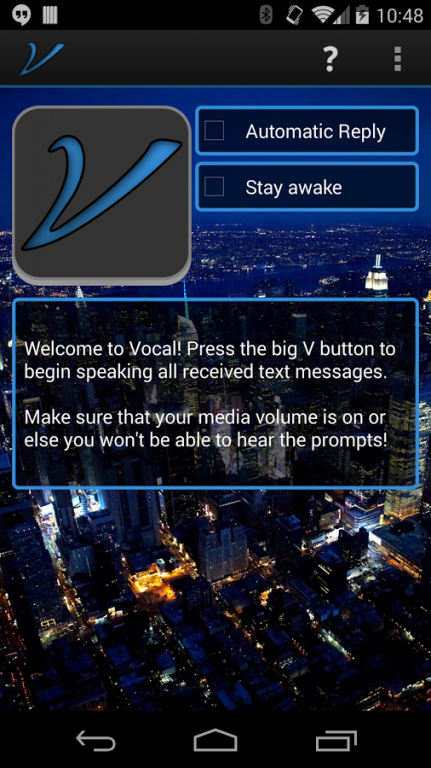
Unmute your texts!
Vocal 2.0 is out, with major upgrades to the entire app! This update includes the following enhancements:
-Vocal’s dialogue engine has been rebuilt from the ground up, creating a much better user experience and allowing more flexibility for user interaction.
-What kind of user interaction? As of this update, in addition to simply replying to incoming text messages, you can now create new messages to any saved contact! Simply start Vocal and swipe down on the app screen and follow the voice command prompts to create a new text message and send it.
-Complete overhaul of the UI.
-Vocal will now display the spoken text on the screen while you have the app opened.
-Progress bar indicating how far you are in the current dialogue and how many steps you have left.
Vocal is the easiest way to respond to text messages hands free. Just wait for the texts to come in and Vocal lets you reply with your voice. All you need to do is follow the prompts. It’s easy!
Use Vocal while driving, jogging, or even if you are just hanging out at home.
App features:
- The best app for hands free texting
- Create a new message with your voice. Just swipe down on the app screen while Vocal is running, then follow the voice prompts.
- Vocal can use your Bluetooth Headset for hands free text messaging
- Automatically activate Vocal when a Bluetooth device is connected.
- Have your phone read your text messages out loud with Text to Speech (TTS)
- Hands free listen to and respond to text messages
- Convenient widget for starting and stopping voice commands engine
- Easy to use, just start Vocal and voice commands automatically activate hands free texting when you receive a text message.
- Notification shows when voice commands are active
- Respond to text messages hands free without even turning on the screen
- Speech Recognition - Voice commands allow you to easily reply to your texts
- NEW Automatically reply to texts with a predefined message
How It Works:
- Turn on Vocal
- When a text message arrives, follow the voice command prompts to listen and respond to the message.
- You can reply to the text by speaking your message when prompted.
- Want to create a message from scratch? No problem! Just swipe down on the main app screen, then follow the simple voice command prompts to create a message to one of your contacts.
The free version of Vocal is limited to 3 text responses per day. There is an in-app purchase for sending unlimited messages daily using Vocal, for just $0.99 (Promotion ends 12/31). Unlocking also gives you access to more of Vocal's features such as starting the app when a Bluetooth device is connected and a convenient toggle widget.
Vocal has been reviewed on givemeapps! Check it out!
http://goo.gl/TlXwau
About Hands Free Texting - Vocal
The company that develops Hands Free Texting - Vocal is JT Montana. The latest version released by its developer is 2.4.2.
To install Hands Free Texting - Vocal on your Android device, just click the green Continue To App button above to start the installation process. The app is listed on our website since 2014-12-20 and was downloaded 0 times. We have already checked if the download link is safe, however for your own protection we recommend that you scan the downloaded app with your antivirus. Your antivirus may detect the Hands Free Texting - Vocal as malware as malware if the download link to com.jtmontana.vocal is broken.
How to install Hands Free Texting - Vocal on your Android device:
- Click on the Continue To App button on our website. This will redirect you to Google Play.
- Once the Hands Free Texting - Vocal is shown in the Google Play listing of your Android device, you can start its download and installation. Tap on the Install button located below the search bar and to the right of the app icon.
- A pop-up window with the permissions required by Hands Free Texting - Vocal will be shown. Click on Accept to continue the process.
- Hands Free Texting - Vocal will be downloaded onto your device, displaying a progress. Once the download completes, the installation will start and you'll get a notification after the installation is finished.
Program Details
System requirements
Download information
Pricing
Version History
version 2.4.2
posted on 2014-12-20
v2.4.2,-Vocal should now properly close its Bluetooth connection when finished interacting with a message.,v2.4.1,-Fixed a crash when starting Vocal with Bluetooth disabled,v2.4,-Bluetooth Headset support,-Icon refresh (Material design),-Bug fixes
Disclaimer
External Download
We do not host Hands Free Texting - Vocal on our servers. We did not scan it for viruses, adware, spyware or other type of malware. This app is hosted by Galad and passed their terms and conditions to be listed there. We recommend caution when installing it.
The APK Download link for Hands Free Texting - Vocal is provided to you by apps112.com without any warranties, representations or guarantees of any kind, so access it at your own risk.
If you have questions regarding this particular app contact the publisher directly. For questions about the functionalities of apps112.com contact us.
